Tutorials
Step-by-step guides with real screenshots. Pick your track: no code at all, or straight to the API.
Prefer video? See WBX Sandbox in action on our YouTube channel.
No coding needed: your first result in Claude
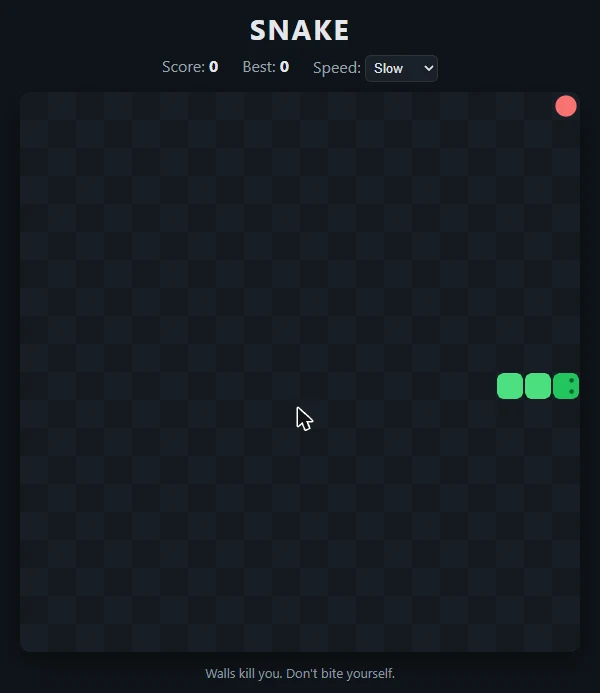
About five minutes. You need a Claude account (any plan) and a free WBX Sandbox account. The example below is real: we asked Claude for a Snake game and played it in the browser.
-
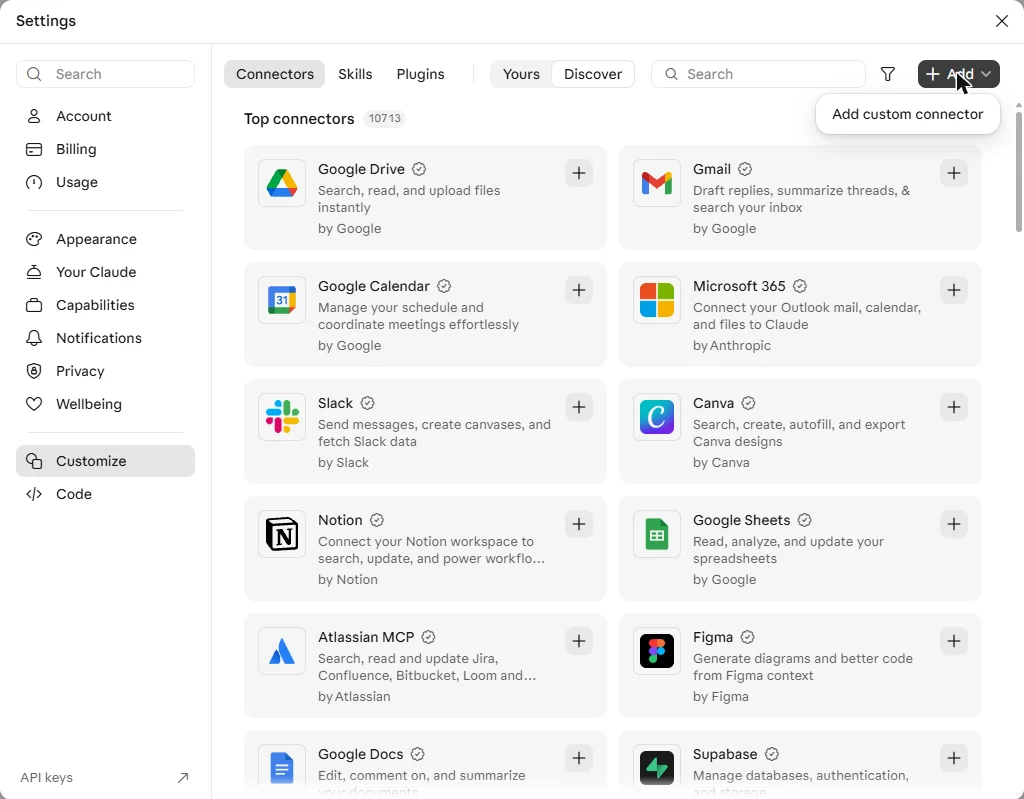
Open Customize → Connectors → Add → Add custom connector
In claude.ai or the Claude desktop app: click your name, then Settings → Customize.
-
Name it and paste the address
Name: WBX Sandbox (any name works). Address:
https://sandbox.wbx.cz/mcp. Click Continue and confirm; leave the advanced OAuth fields empty.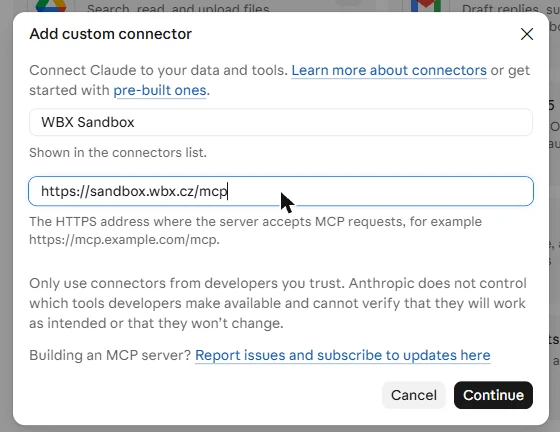
-
Sign in to WBX Sandbox and click Allow access
Claude opens our sign-in page. Don't have an account yet? Create one for free – no card needed.
-
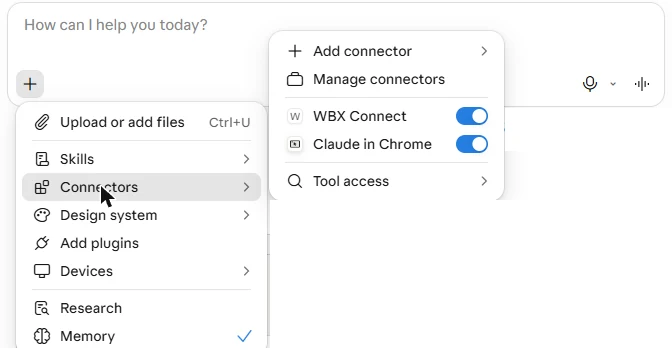
In a new chat, switch the connector on
Click + → Connectors and make sure the switch next to your WBX connector is on. (In our screenshots the connector is called “WBX Connect”.)
-
Ask for a result
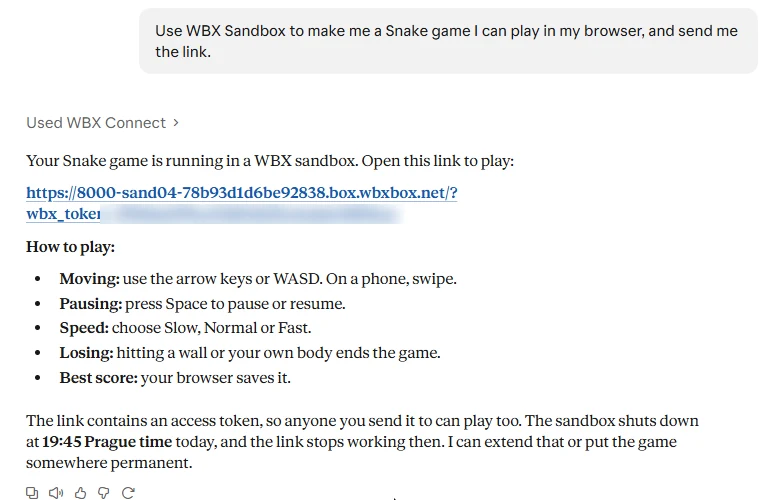
Start with “Use WBX Sandbox to …” and say what you want back. We typed: “Use WBX Sandbox to make me a Snake game I can play in my browser, and send me the link.” About half a minute later Claude answered with a private link.
-
Open the link
The game runs in the sandbox and works on a phone too. The link contains an access token – whoever has it can open the page – and stops working when the sandbox ends.
How to ask so it works the first time
- Name the tool. “Use WBX Sandbox to …” – otherwise the assistant may try to answer from memory.
- Say what you want back: a link you can open, a file (the assistant gives you a download link), a chart, or just the answer.
- Your files: paste or attach small ones; for larger files give a link the sandbox can download from – it has internet unless you turn it off.
- Long work? Ask it to “run it as a background job and tell me when it's done” – you can close the chat.
- Need it longer, or done early? Say “keep the sandbox for two hours” or “stop the sandbox now”. You pay only while it runs.
- Curious what happened? Click Used WBX Connect above the answer to see every step.

index.html, started a small web server and asked for a public address of its port.Ideas to try
“Use WBX Sandbox to read this PDF aloud and give me an MP3.”
“Use WBX Sandbox: which month in this spreadsheet had the best sales? Draw me a chart.”
“Use WBX Sandbox to shrink these photos for the web and make a GIF from the video.”
“Use WBX Sandbox to take screenshots of example.com on a phone and on a laptop.”
“Use WBX Sandbox without internet to run this script and tell me what it does.”
“Use WBX Sandbox to process all these files as a background job, with a limit of $1.”
Using ChatGPT? The steps are similar – see Connect ChatGPT. Cursor, VS Code, Codex or Gemini CLI? See Connect your AI → For developers. Something not working? See troubleshooting.
For developers
The same platform without the chat window: one command for Claude Code, a dependency-free Python SDK, or plain REST.
Claude Code in one minute
claude mcp add --transport http wbxsandbox https://sandbox.wbx.cz/mcp
claude
> /mcp            # sign in to WBX Sandbox in the browser, approve access
> Clone my repo into a WBX sandbox, run the tests and fix what fails.
Long test runs come back as a short summary (get_job_logs with mode=summary) instead of thousands of log lines. In CI pass an API key instead: --header "Authorization: Bearer YOUR_API_KEY".
Python SDK quickstart
pip install wbxsandbox
export WBXSANDBOX_URL=https://sandbox.wbx.cz
export WBXSANDBOX_API_KEY=YOUR_API_KEY

python3 - <<'EOF'
from wbxsandbox import Sandbox
with Sandbox.create(template="base") as sb:
    print(sb.run("python3 -c 'print(6 * 7)'").stdout)
EOF
Create the key in the portal under API keys. Next: SDK reference.
Where to go next
- Give your own model a “run code” tool
- Tool calling with any model, executed in a sandbox.
- Background jobs and batches
- Submit and disconnect; price limits, retries, result files and receipts.
- Web apps and public URLs
- Exactly what Claude did for the Snake game, from your code.
- LangChain Deep Agents
- Use a sandbox as the agent's execution backend.
- REST API
- Plain HTTPS and JSON from any language.
Source code
- WBX-Sandbox/wbxsandbox-python – the Python SDK (PyPI)
- WBX-Sandbox/langchain-wbxsandbox – the LangChain integration (PyPI)
- All WBX Sandbox repositories on GitHub
Videos: our YouTube channel.